Reporting an Issue
Making good bug reports is a great way to help increase the software quality of GIMP. A good bug report provides unambiguous step-by-step instructions on how to reproduce the bug among other information requested by the developers. This makes it easy for the developers to reproduce and fix the bug.
Related to bug reports are enhancement requests. It is recommended to discuss enhancements with developers first, for instance on IRC or in the forums. This is to make sure that the enhancement requests that are filed are well-specified and aligned with the overall goals the developers have for GIMP.
Reporting a Bug
The goal is to give the developers as much information as possible to help them understand what needs to be fixed:
Ensure to use the latest GIMP
Use gimp --version or the about dialog (Help → About GIMP) to check your
GIMP version. Next compare to the most recent GIMP build on
www.gimp.org.
We recommend to try to reproduce the bug on the latest automatic development build.
Your bug may have been fixed already.
Reproduce the bug on latest GIMP
Attempt to reproduce the problem in the latest GIMP version. Go do what you were doing when it happened and see if you can trigger the bug again.
If you know how to do so, start the program from a terminal, or you can follow the instructions. Sometimes it will output error messages etc. These can be helpful on a later stage of this tutorial.
To narrow down the exact cause of the problem, attempt to reproduce it in other ways. Prepare yourself to explain how to reproduce it in your bug report. If you are running GIMP in another language, try switching GIMP to English so you can report menu items exactly with the English menu item name. It simplifies developers’ task.
If you cannot reproduce the bug and don’t have any reliable information, reporting might be fruitless and only waste everyone’s time. If it recurs, consult with appropriate discussion channels. Perhaps someone else can find the key to reproducing it.
Select the issue template
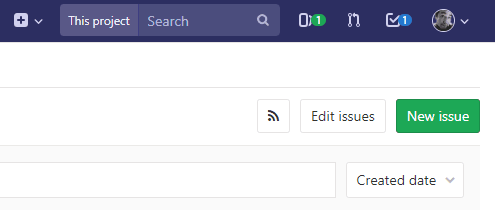
Go to GIMP issues. If you don’t have a login yet, follow the directions to create one. Then, select “New item”.
Choose a template to pre-populate the Description field with important information to help the developers track down the problem:
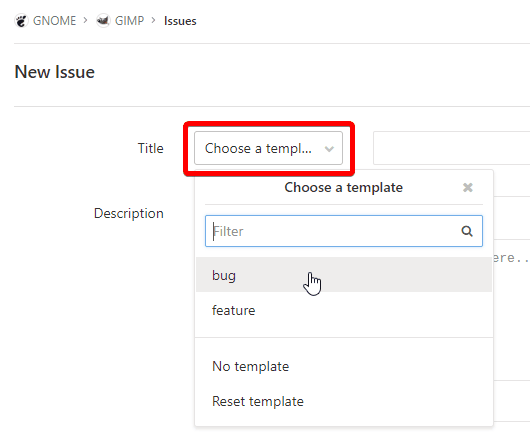
Give your bug a good Title and if you chose a template you should see some text in the Description field already.
Fill all the issue template
Here in the Description you’ll have to tell the developers everything requested by the template. Just do your best to tell them about it. If you write down everything clearly you’ll be going a long way to helping get the bug addressed.
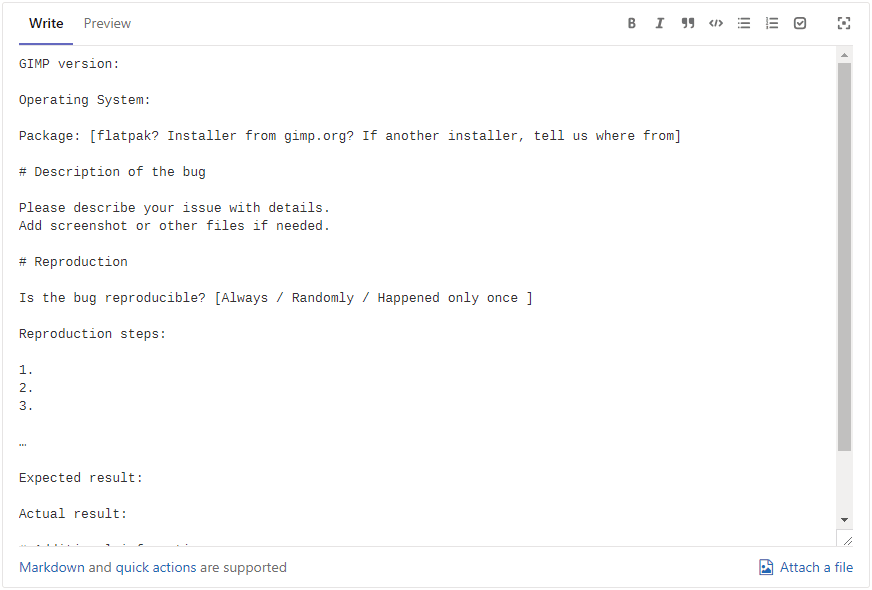
Remember, be clear and considerate! This is immensely helpful in tracking down what the problem is and how to possibly fix it. By “clear and considerate” we mean:
- Avoid negative emotional writing which only generates more upsetting interactions.
- Stay on topic by describing only one bug per report created.
- Write with your own words (do not paste AI analysis!).
If available, please add the output log you got by running GIMP from terminal to the appropriate section of the bug report description. Also add full (not cropped) screenshots or other files using the clip button on GitLab. Please do not paste the output or other files into the comments unless requested to do it, since these, outside the description, make the report very hard to triage.
Finally, click on “Preview” button to ensure the report is not empty and publish the report by clicking the blue “Create issue” button in the bottom. Do not mark the issue as confidential unless you know what you are doing.
The Wait Patiently Part
Whee!! You survived! If you managed to get through all this and submit your bug report, be happy. Be proud as a contributor to the community!
You will later get e-mails about your bug. It may not be immediate. Since GIMP is developed by a community, by volunteers which have a lot of tasks, sometimes it may take some time. Though we try to always answer. Similarly when we ask you questions, we don’t expect you to answer immediately, though we expect you to answer eventually and we expect you to say when/if the bug is solved (For example, you update something else on your system and the bug no longer appears). Otherwise it makes no sense to report. In short, we acknowledge that everyone has a life outside of GIMP, you as much as the developers.
Answers might include a request for more information (like a more specific error message or fancy technical stuff like a stacktrace). If you don’t know how to provide such information and the bug report is closed, or you get something that says your bug is not a bug, was already fixed or is a duplicate to another report, do not be discouraged from reporting in the future. Next time it might be. Submitting careful bug reports and providing additional information where possible helps make GIMP better. The day will come where you submit a bug and later get an e-mail that says your bug is “FIXED” or “RESOLVED”. Then you will know that some developer out there found your bug, reproduced it, and fixed it. 🎉
Security Issues
Some bug reports may be related to security issues. For example, a file plug-in may be vulnerable to a buffer overflow allowing arbitrary code execution when loading an image.
We believe that the best way to report these vulnerabilities is still through our GitLab issues, as described above. This will ensure that the bug is reviewed and handled quickly. The only difference is that you will need to choose the proper security report template and check the box “This issue is confidential and should only be visible to team members with at least Reporter access.” in the GitLab issue creation form (this checkbox will hide the bug report from anyone else but core members).
But if you really do not want to use GitLab for security reports and you do not
mind some extra delay, you can also contact a limited set of GIMP developers by mail @gimp.org, using the special alias security. What will happen next is
that a developer will review the issue and submit it in GitLab, usually as a
hidden bug report only visible to developers.
This will take a bit longer than if you directly submit the bug yourself, but we know that some people have a policy of not disclosing security vulnerabilities publicly, so we provide that address for their convenience.